> ## Documentation Index
> Fetch the complete documentation index at: https://zuperinc-section23.mintlify.site/llms.txt
> Use this file to discover all available pages before exploring further.
# Calculating Job Profitability for Fixed Price Service Jobs
Fixed Price billing offers customers a predetermined, flat rate for a specific service. The customer pays a fixed amount, regardless of how long the job takes or the effort required to complete it. This model offers predictable costs for customers and helps businesses maintain clear and upfront pricing.
Zuper tracks your actual job costs, including labor hours, parts, and expenses, to give you complete visibility into your true profitability. This allows you to see exactly how much you're earning on each job by comparing the fixed price charged to the customer against your actual costs.
This guide walks you through the process of adding a fixed price service to a job, understanding the cost breakdown, and reviewing profit.
**Prerequisite:**
Ensure you have created a service in the Master Parts and Service module and set the **Unit Selling Price** for the service. Refer to the [Create Parts, Products, & Services](/Inventory_Management/Parts_Services/Create_New_Part_Service) guide.
**Let’s add a fixed price service to a job and calculate profitability!**
1. Go to the respective **Job Details** page.
2. **Add a fixed price service in the Line Items**: These include the price of all products, parts & services added to a Job.
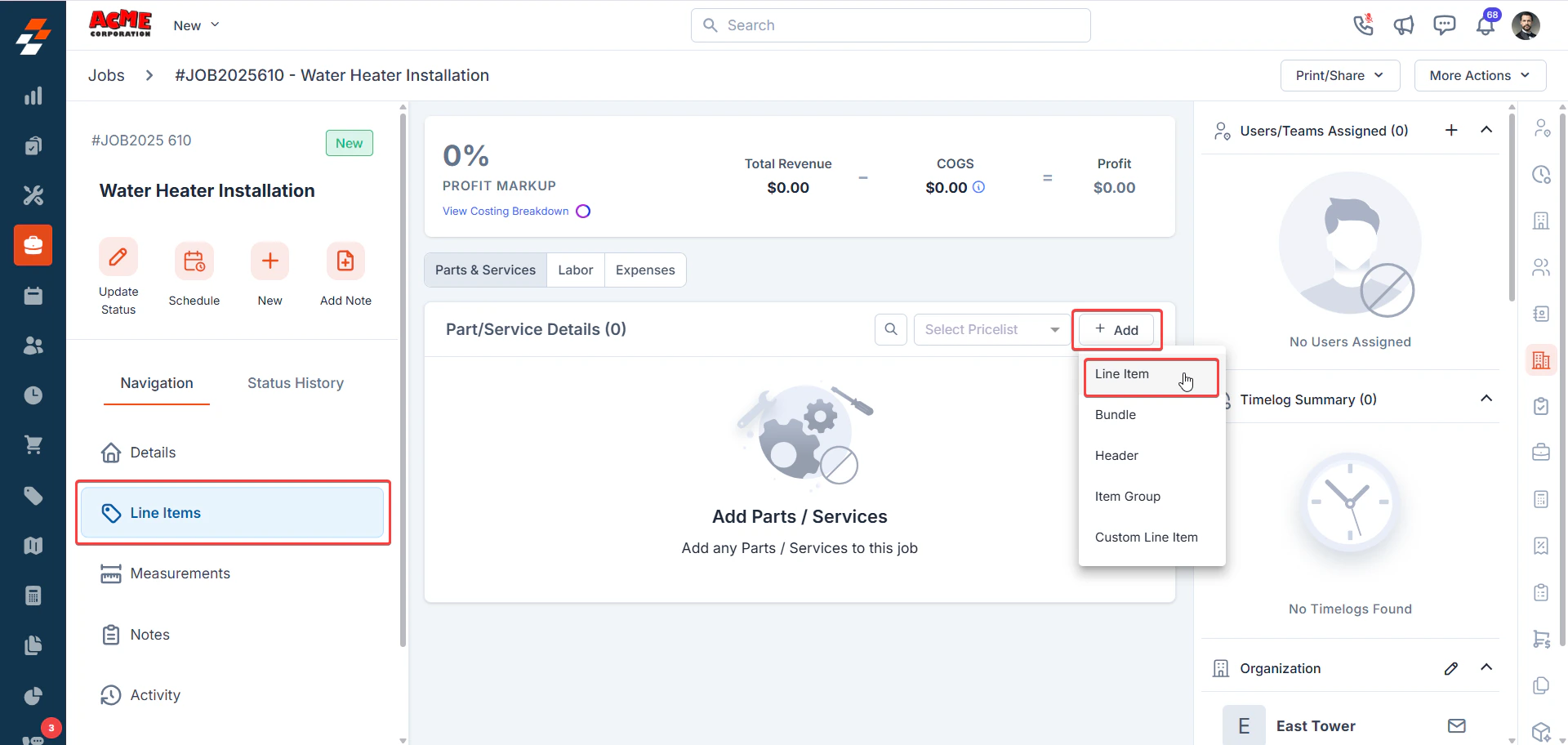
3. On the **Job Detail Page**, locate the **Line Items** section.
* On the **Parts & Services** tab, click **+ Add** and select the **Line Item**.
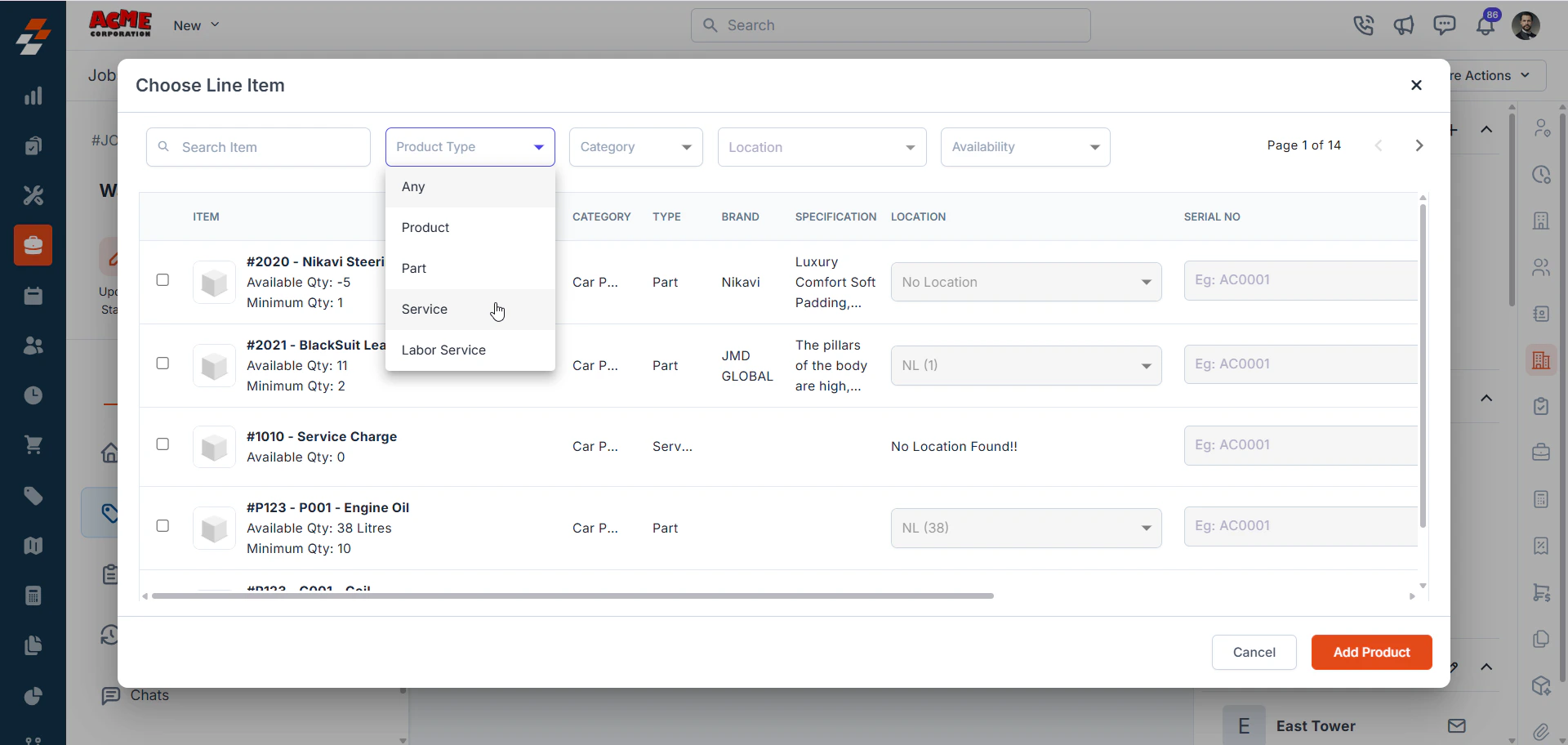
 * In the **Product Type** field, choose **Service**.
 * Select the relevant service (e.g., Water Heater Installation) from the list. If you want to add more parts, products, and services, add to it.
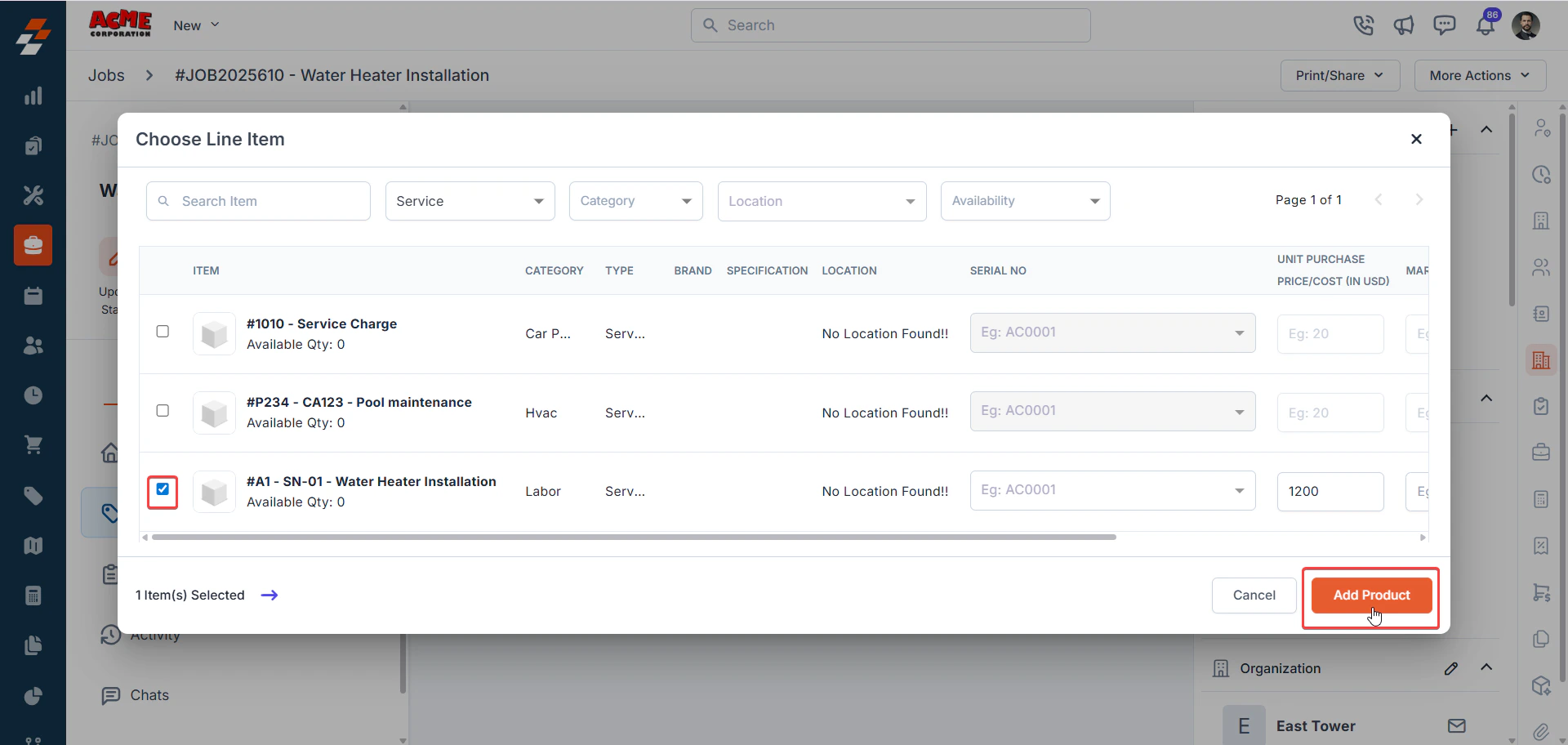 * Click **Add Product** to include the service in the job.
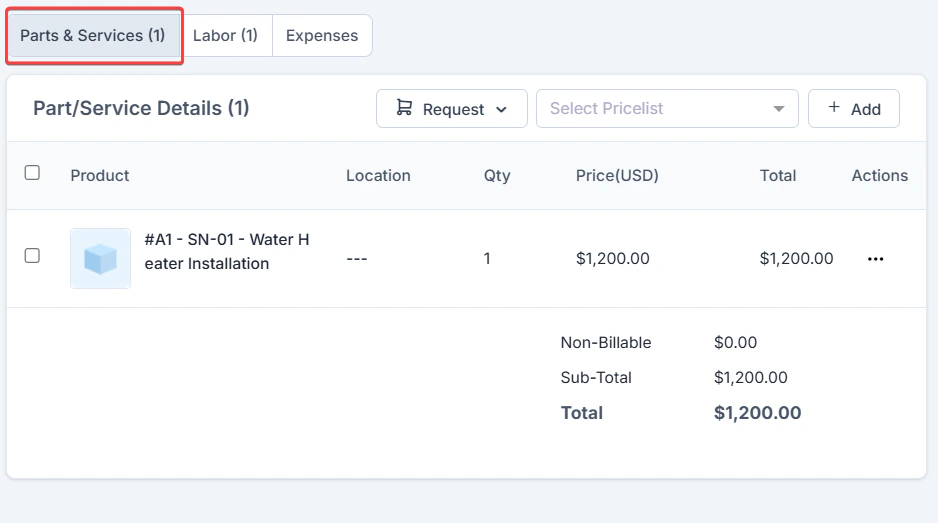
**Note:** You can add multiple parts, products, and services to a Fixed Price job as needed. When you add products or parts as line items, their selling price contributes to the job's Total Revenue, and their purchase cost is added to COGS.
* Click **Add Product** to include the service in the job.
**Note:** You can add multiple parts, products, and services to a Fixed Price job as needed. When you add products or parts as line items, their selling price contributes to the job's Total Revenue, and their purchase cost is added to COGS.
 4. **Labor** tab: Displays the internal labor cost based on the actual time technicians spend on the job. This cost is calculated using each technician’s **fully loaded hourly rate**, the **number of hours worked**, and the **assigned Cost Code** (such as Regular, Overtime, Double Time, or Holiday).
**Important:** The labor costs shown here are for your internal cost tracking and profitability analysis, not what the customer pays. The customer pays the fixed service price set in Step 2.
4. **Labor** tab: Displays the internal labor cost based on the actual time technicians spend on the job. This cost is calculated using each technician’s **fully loaded hourly rate**, the **number of hours worked**, and the **assigned Cost Code** (such as Regular, Overtime, Double Time, or Holiday).
**Important:** The labor costs shown here are for your internal cost tracking and profitability analysis, not what the customer pays. The customer pays the fixed service price set in Step 2.
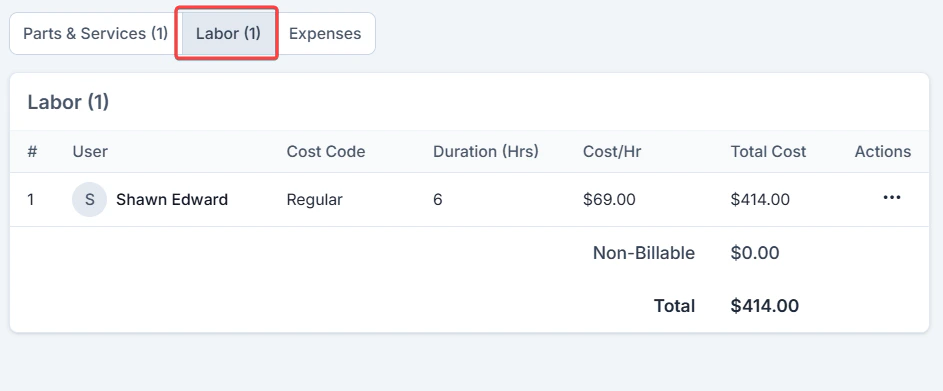 * If the [Timelogs](/Timesheets_Management/Timelogs/Overview) feature is enabled, Zuper automatically captures the time spent on the job. If Timelogs is disabled, you must **manually add time entries** by clicking **+ Add** in the Labor tab.
* You can also update the **Cost Code** for a technician by editing their time entry. When a Cost Code is changed, Zuper creates a new line item instead of modifying the existing one, which helps maintain a clear audit trail of labor cost changes.
**Note:** If your organization is using the **Timelog** feature, you **cannot delete a labor line item directly** if it was created through a time log. To remove such a labor line item, first delete all related time logs for that technician within the job, and then delete the labor line item. This ensures corrections can be made when a technician logs time against the wrong job.
If **Timelog** is **not enabled**, you can delete labor line items directly from the job.
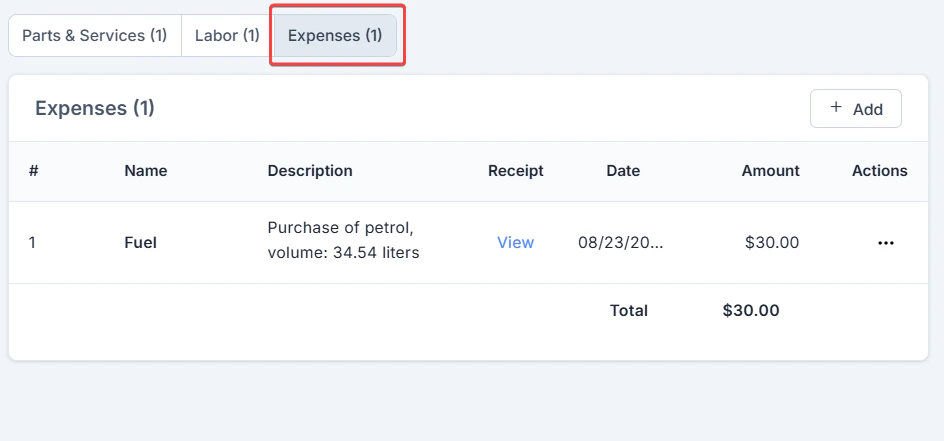
5. **Expenses** tab: Add job-related expenses (e.g., travel costs) if the **Expenses** setting is configured.
* If the [Timelogs](/Timesheets_Management/Timelogs/Overview) feature is enabled, Zuper automatically captures the time spent on the job. If Timelogs is disabled, you must **manually add time entries** by clicking **+ Add** in the Labor tab.
* You can also update the **Cost Code** for a technician by editing their time entry. When a Cost Code is changed, Zuper creates a new line item instead of modifying the existing one, which helps maintain a clear audit trail of labor cost changes.
**Note:** If your organization is using the **Timelog** feature, you **cannot delete a labor line item directly** if it was created through a time log. To remove such a labor line item, first delete all related time logs for that technician within the job, and then delete the labor line item. This ensures corrections can be made when a technician logs time against the wrong job.
If **Timelog** is **not enabled**, you can delete labor line items directly from the job.
5. **Expenses** tab: Add job-related expenses (e.g., travel costs) if the **Expenses** setting is configured.
 ## **Review Job Profitability**
Once line items, labor hours, and expenses are added, Zuper calculates job costs and profitability automatically. Check the **Job Profitability Bar** at the top of the **Line Items** section on the **Job Detail** page.
## **Review Job Profitability**
Once line items, labor hours, and expenses are added, Zuper calculates job costs and profitability automatically. Check the **Job Profitability Bar** at the top of the **Line Items** section on the **Job Detail** page.
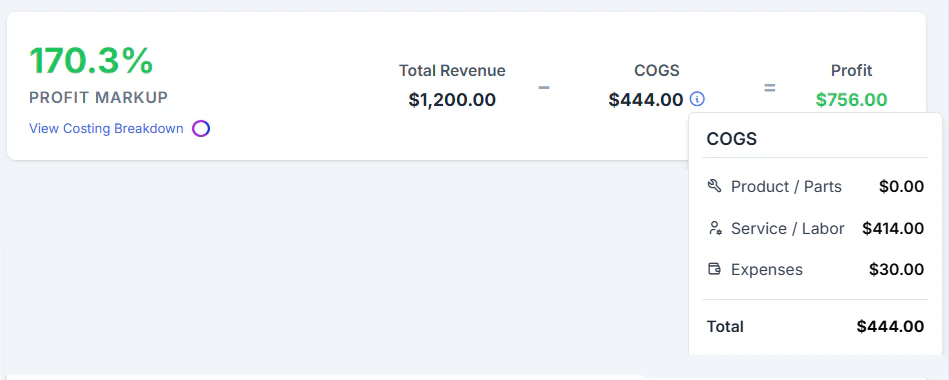 ***Note***: Visibility of cost breakdowns depends on your **Job Costing Permissions** settings. Refer to the Job Costing Permission article for more info.
Here’s a detailed breakdown of profitability for a **Water Heater Installation** job billed using the **Fixed Price** method in Zuper:
***Note***: Visibility of cost breakdowns depends on your **Job Costing Permissions** settings. Refer to the Job Costing Permission article for more info.
Here’s a detailed breakdown of profitability for a **Water Heater Installation** job billed using the **Fixed Price** method in Zuper:
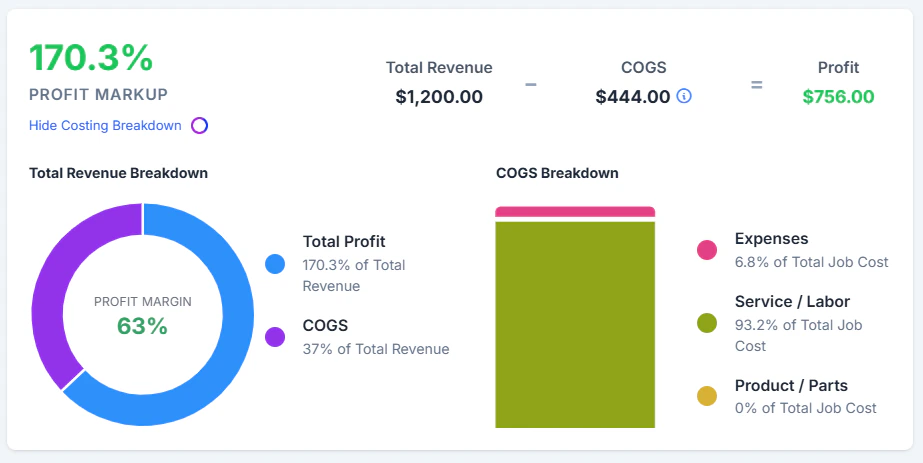 **Total Price (Revenue): +\$1,200**\
This is the fixed price agreed upon with the customer before the job began.
**COGS: -\$444**
| **Component** | **Details** | **Cost** |
| :--------------- | :--------------------------------------------------- | :-------- |
| Parts & Services | Water Heater Installation | - |
| Labor | Technician Shawan Edward worked 6 hours at \$69/hour | -\$414 |
| Misc. Expenses | Travel fuel expense | -\$30 |
| **COGS:** | \$0 (Parts) + \$414 (Labor) + \$30(Misc.) | **\$444** |
**Profit:**
`$1,200`(revenue) − `$444`(total job cost in system) = `$756` **profit**
**Profit markup:** `$170.3%`
### **FAQs**
1. **Can I specify a Price Code for a Fixed Price service?**\
Price Codes are not applicable to Fixed-Price services in Zuper, as the entire job is billed at a flat, predefined amount.
2. **Should I create a separate category for labor services?**
Yes, we recommend creating a “**Labor**” category to help distinguish labor-related services from other parts or materials. This improves clarity in reporting, job costing, and service management.\
To create or manage service categories:
Go to: **Settings** > **Modules** > **Parts and Services** > **Category Settings**.
3. **Should I specify the Unit Purchase/Cost Price when creating a fixed-price service?**
When creating a **fixed-price service** (e.g., *AC Installation*), do not specify the Unit Purchase/Cost Price. In Zuper, labor costs are calculated separately based on technician hours and are not tied to the service item itself.
**Total Price (Revenue): +\$1,200**\
This is the fixed price agreed upon with the customer before the job began.
**COGS: -\$444**
| **Component** | **Details** | **Cost** |
| :--------------- | :--------------------------------------------------- | :-------- |
| Parts & Services | Water Heater Installation | - |
| Labor | Technician Shawan Edward worked 6 hours at \$69/hour | -\$414 |
| Misc. Expenses | Travel fuel expense | -\$30 |
| **COGS:** | \$0 (Parts) + \$414 (Labor) + \$30(Misc.) | **\$444** |
**Profit:**
`$1,200`(revenue) − `$444`(total job cost in system) = `$756` **profit**
**Profit markup:** `$170.3%`
### **FAQs**
1. **Can I specify a Price Code for a Fixed Price service?**\
Price Codes are not applicable to Fixed-Price services in Zuper, as the entire job is billed at a flat, predefined amount.
2. **Should I create a separate category for labor services?**
Yes, we recommend creating a “**Labor**” category to help distinguish labor-related services from other parts or materials. This improves clarity in reporting, job costing, and service management.\
To create or manage service categories:
Go to: **Settings** > **Modules** > **Parts and Services** > **Category Settings**.
3. **Should I specify the Unit Purchase/Cost Price when creating a fixed-price service?**
When creating a **fixed-price service** (e.g., *AC Installation*), do not specify the Unit Purchase/Cost Price. In Zuper, labor costs are calculated separately based on technician hours and are not tied to the service item itself.